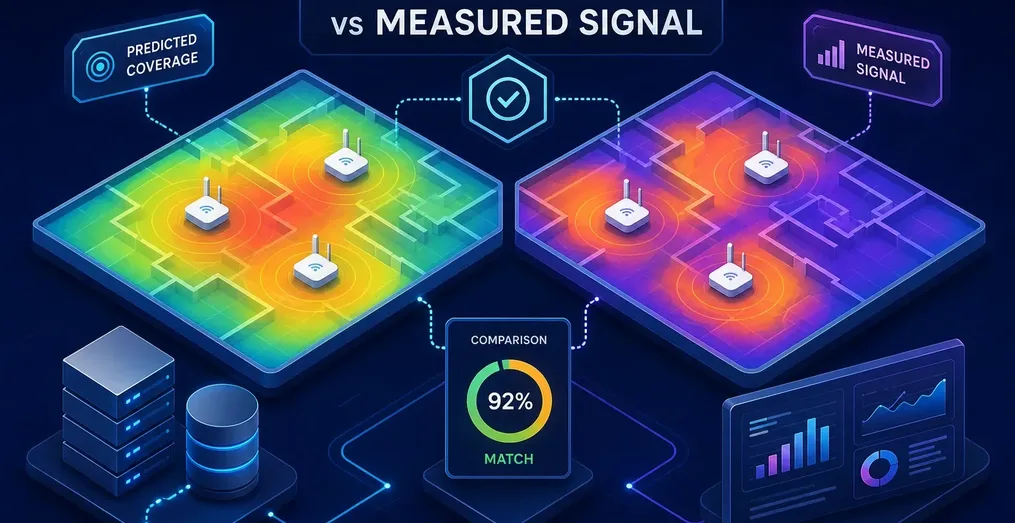
An RF coverage map is a geographic visualization of predicted signal strength, generated by a propagation model. Checking it against measured data shows where the model is wrong and, more usefully, why. The workflow has two phases: first, build the prediction from accurate transmitter inputs and a terrain-aware model; second, drive the coverage area, collect field measurements, and compare both in one place.
A map that only shows what the model predicts is a planning tool. Add measured data and it becomes a verification tool. That matters when you need to demonstrate real-world coverage, diagnose a listener or viewer complaint, or validate a new transmitter or antenna configuration.
This guide covers how the prediction is built, which propagation models suit broadcast work, which tools generate the maps, why predictions and field measurements disagree, and how to run the comparison efficiently.
Key takeaways
- Two-phase workflow: Build the RF coverage map prediction first, collect field measurements second, then overlay both to find where the model is accurate and where it diverges.
- ITM is a proven terrain-aware model for broadcast: The Irregular Terrain Model (ITM), also known as Longley-Rice, is a widely used terrain-aware choice for VHF and UHF coverage prediction. ITU-R P.1546 and P.1812 are also widely used for broadcast planning.
- Terrain data quality matters: A 30-meter elevation model smooths narrow ridges and valleys, and radar-derived products like SRTM can reflect off tree canopy rather than bare ground.
- Transmitter inputs drive the result: ERP, antenna height, azimuth, and beam tilt each shift coverage in different ways, and small input errors compound across the service area.
- Divergence is diagnostic information: Systematic offsets between predicted and measured signal point directly at transmitter parameters, antenna patterns, or terrain data that need investigation.
- Overlay tools close the loop: The Avateq Logreader loads a drive-test log exported from an Avateq AVQ200 and displays the measured signal alongside the station's predicted signal on a single synchronized map and graph.
What is an RF coverage map, and what does it show?
An RF coverage map is a color-coded grid where each cell represents the predicted received signal level at that location, calculated by running a propagation model across thousands of geographic points. "Predicted" is the key word. The map shows what the math says should arrive at a receiver, given the inputs you supply. It is not a measurement of what actually arrives in the field.
The relationship to a link budget is direct. A coverage map runs the same link budget calculation across every cell to paint a spatial picture of signal strength. Change the transmitter ERP by 3 dB and every cell shifts by 3 dB. The map shows which areas move above or below a reception threshold and which do not.
The inputs fall into two groups:
- Geometry inputs: Transmitter coordinates, antenna height above ground/terrain, azimuth, and mechanical or electrical beam tilt.
- Power and pattern inputs: Frequency, effective radiated power (ERP), and the horizontal and vertical radiation patterns.
ERP changes overall reach. Height changes horizon and terrain visibility. Azimuth rotates the directional pattern on the map. Tilt redistributes energy between near-in and far-out locations. The terrain dataset underneath matters just as much, because the propagation model can only shadow and diffract around features that exist in the elevation data it uses.
Which propagation model fits broadcast coverage prediction?
Free-space path loss (FSPL) assumes an unobstructed, straight-line path with no terrain, no clutter, and no reflections. In broadcast engineering, it serves as a baseline reference. If a measured signal is weaker than FSPL predicts, something along the path is blocking or attenuating the signal. FSPL is a useful first overlay for flagging heavily shadowed measurement points before you commit to a full terrain-model calculation.
For broadcast coverage prediction, ITM (Longley-Rice) is a standard terrain-aware choice for VHF and UHF. It uses a digital elevation model (DEM) to calculate diffraction loss over ridges, hills, and valleys along each radial from the transmitter. ITU-R P.1546 is also commonly used for standardized point-to-area broadcast predictions, while ITU-R P.1812 is often preferred for detailed, path-specific terrain studies.
For terrain data in the United States, SRTM at roughly 30-meter resolution is a common starting point, and USGS 3DEP products at 10-meter or 3-meter resolution improve terrain geometry where available. One limitation is worth keeping in mind: radar-derived products like SRTM often reflect near the top of the tree canopy rather than bare ground in forested areas. If a propagation model then applies a separate forest clutter loss on top of that raised elevation profile, some of the same obstruction may be counted twice.
What tools generate an RF coverage map?
Several free and paid RF coverage map generators are available, and the right choice depends on your workflow.
| Tool | Workflow type | Propagation model | Terrain data | Best for | Cost |
|---|---|---|---|---|---|
| SPLAT! | Command-line, local | ITM/Longley-Rice | User-supplied SDF tiles from SRTM or USGS | Batch coverage maps for multiple sites; auditable, repeatable runs | Free, open source |
| Radio Mobile | Desktop GUI, local | ITM/Longley-Rice | SRTM downloaded by the application | Visual coverage planning, path profiles, and antenna patterns in one environment | Free |
| CloudRF | Web browser or REST API | ITM, ITU-R P.1812, P.526, and others | Hosted global terrain and clutter datasets | Team collaboration, API-driven workflows, studies without local file management | Free plan available; paid tiers for broader API use |
SPLAT! is free and open source, runs ITM from the command line, and can batch-generate coverage maps for multiple transmitter sites. You supply terrain elevation data separately as SPLAT Data Format (SDF) tiles, which keeps the workflow explicit and auditable. Radio Mobile wraps the ITM engine in a desktop graphical interface and handles antenna patterns and point-to-point path profiles in one environment, suiting exploratory planning without scripting. CloudRF runs terrain-aware propagation in a browser or through a REST API using hosted terrain and land-cover data, eliminating local elevation file management.
All of these tools produce the predicted layer. None of them tells you whether the prediction matches reality in the field.
Why does your measured signal disagree with the prediction?
Terrain data resolution is a frequent cause. A 30-meter DEM smooths out sharp ridgelines, narrow valleys, highway cuts, embankments, and small hills that matter significantly to VHF and UHF propagation. Generic land-cover classes add to the discrepancy. A broad label like "urban" or "forest" applies uniform average loss values rather than reflecting the specific building heights, construction materials, or foliage density along a street. Two locations with the same land-cover classification can produce very different measured levels, while the model applies the exact same attenuation factor to both.
Transmitter and antenna inputs introduce their own offsets. Small errors in antenna height, radiation pattern, beam tilt, or azimuth compound across the coverage area- a few degrees of bearing error on a directional array can noticeably shift coverage near the edge of the service contour. Furthermore, the ERP entered into a model is typically the licensed or rated value; actual radiated power can differ due to transmitter output drift, uncalibrated combiner and filter losses, feedline degradation, or pattern distortion from the tower structure itself.
Beyond static parameters, local multipath, reflections from buildings and terrain, and atmospheric ducting introduce real-world variations that no static terrain model captures. These effects change with time, season, and local geometry, and a single deterministic prediction cannot represent them.
How do you compare an RF coverage map and measured data in one place?
The Avateq Logreader is a free web application built specifically for this comparison. The workflow starts in the field: drive your test route with an Avateq AVQ200 logging live RF metrics and GPS coordinates, export the log from the unit, and load it directly into the Logreader in your browser.
Once loaded, your measured drive-test data appears simultaneously on an interactive map and a synchronized time-series graph. You can inspect received signal power (in dBm), MER, and error rates along every stretch of the route. The map color-codes the route by reception quality, from easy indoor reception down to no reception, using thresholds based on Doug Lung's reception classification. When you select a station from the built-in database of US and Canadian transmitters, the Logreader overlays the station's predicted coverage contours on the map and plots the predicted signal level as a reference line directly on the graph next to your measured values.
You can compare your measurements against two propagation models:
- FSPL calculates almost immediately and works well as a fast baseline check.
- ITM/Longley-Rice is terrain-aware and accounts for land cover such as urban areas and forest. It takes slightly longer to compute the first time a station is selected, but once both models are generated, you can toggle between them instantaneously.
Interpreting the overlay is straightforward:
- Where measured points track the predicted line: The propagation model and station database parameters accurately represent that path.
- Where measured points fall consistently below prediction: Look for unmodeled terrain shadowing, dense local clutter, or lower-than-expected radiated power in that azimuth.
- Where measured points exceed prediction: The model may be overestimating diffraction or clutter loss, or constructive reflections may be reinforcing the signal.
You can attach text comments to individual data points to document local anomalies along the drive, and exporting a report saves your annotations and view settings so anyone opening the file later sees the exact same analysis. For long drive tests, built-in downsampling keeps large logs responsive and easy to navigate. Looking ahead, Logreader Version 4 is planned to expand these capabilities further with dedicated interference analysis and additional coverage verification tools.
Frequently asked questions
Should I use FSPL or ITM/Longley-Rice as my predicted overlay?
If the path has significant elevation change between the transmitter and receiver, go straight to ITM/Longley-Rice, as it accounts for terrain diffraction and clutter. Use FSPL as a quick sanity check on flat, unobstructed paths, or to quickly spot heavily shadowed segments before running the full terrain model.
How do I collect the measured data I need for this comparison?
Drive the coverage area with a measurement receiver logging RF signal parameters and GPS position together. With an Avateq AVQ200, you simply export the recorded log after the drive and drop it into the Logreader. How you plan the route determines how well the dataset represents actual coverage, focus on roads that cross terrain transitions, ridgelines, and valley corridors, as well as the fringes of your predicted service contour. We strongly recommend using a roof-mounted omnidirectional receive antenna for drive testing so that changes in vehicle heading around curves and intersections do not introduce directional gain variations into your measurements.
My predicted and measured signals match in open terrain but diverge near hills and tree lines. What does that tell me?
It indicates that your baseline link budget and free-space loss are aligned, but the model is misestimating terrain diffraction or foliage attenuation. Revisit the DEM resolution in that sector and check whether a separate clutter loss layer is being stacked on top of a canopy-inclusive terrain dataset like SRTM. Where available, switching to higher-resolution elevation data (such as 10-meter or 3-meter USGS 3DEP) often improves prediction accuracy in hilly transition zones.
Build the map, measure it, then compare
A reliable coverage study requires both sides of the equation: build the prediction from an appropriate propagation model and accurate site parameters, collect real-world measurements in the field, and bring both datasets into one view to see where they agree and where they diverge.
The comparison is where the real engineering insight happens. Gaps between prediction and measurement are not failures. They are diagnostic clues that point toward model inputs that need refinement, terrain data limitations, or physical transmitter and antenna conditions that warrant a closer look. A consistent negative offset across an entire azimuth sector tells one story; a localized dip in a wooded valley tells another. Overlaying both layers makes those patterns immediately visible.
We built the Avateq Logreader to make this verification step effortless: load your drive-test log, pick your station, and compare measured and predicted performance in one unified view. If you have questions about the Logreader or the AVQ200, or want to discuss how they fit into your station's coverage verification workflow, get in touch with our team. We are always glad to walk you through it.